Nothing seems to happen when I run the initial “import test_your_code” function at the top of Exercise 1. Then when I run the “test_your_code” for exercise 1-A, I receive the “failed test case” message below despite my code seeming to appear correct. I have tried restarting the kernel, as well as refreshing the workspace, including getting the latest version as detailed in the instructions. What can I do now to clear this problem? Thank you.

Hi @authoresbrown ,
The error messages suggested there is a problem with the input parameters not having the correct values. It could be that you have not run the code from the beginning. It is essential to run the code from the beginning especially if the kernel has been idle for a while or you just log on to your account.This to ensure that the kernel is in the environment with all the information needed to execute the code.
Try to do a clean run:
Kernel ->restart and clear output
Cell → run from start
Hello! I’ve attempted the Kernel - restart and clear output several times, as well as run cells from the start. Nothing seems to happen when I run this cell:

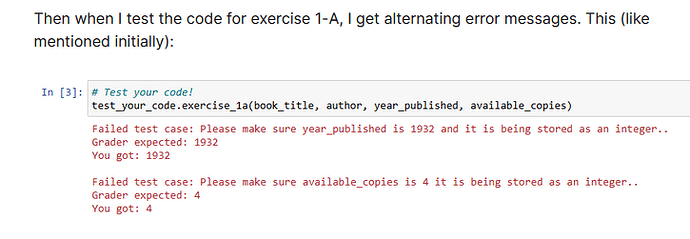
Then when I test the code for exercise 1-A, I get alternating error messages. This (like mentioned initially):
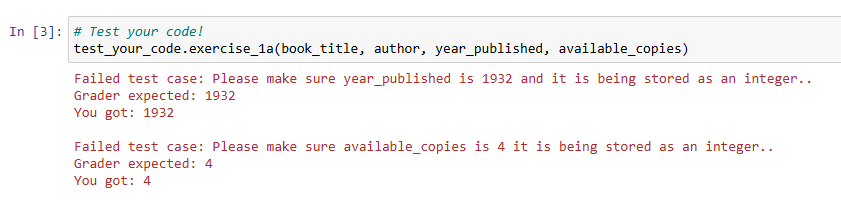
or this:

Are there any other ideas I can try? I’m unsure what I’m doing wrong.
That is expected. Importing a package has no visible effect until you later run some code that uses that package.


I have done that several times. If you look back on my comments on this thread, you’ll see that I’ve run the test code. I’ve cleared kernels. I’ve restarted my system. I’ve gone through all the troubleshooting advised in the module. This is beginning to get frustrating as I’m being provided the same “advice” despite my stating I’m doing everything required. I need to know what else I can try.
I’ve also tried using a different browser.
The mentors keep giving you that advice, because in the overwhelming majority of reports of similar issues, it’s due to not running all of the cells every time you open the notebook.
Also could happen due to adding or deleting cells within the notebook. Essentially, making any changes to the notebook outside of the areas marked for your code.
Hopefully a mentor who specializes in that specific course will be able to provide some more detailed help.
No need. I have unenrolled from this course. Thank you.
Hi @authoresbrown ,
I have had a look of the course content without accessing the graded assignment as I am not enrolled to the course. Based on what I can find, I believe the problem you experienced is two folds:
- The notebook has a 2 hours time limit. Outside of this time limit, any coding you added is not saved. Therefore, if you have updated your file, the new added part would not be in the file, even though you can see it on the notebook. This could cause discrepancy and error in the output, and also explain why when you run your code at different time, different error is reported, as in the case of NameError where the import statement at the top of the notebook has not been linked to the code.
- The variables should be declared as integer. If it is represented as string, then, the output would failed the grader’s expected output due to datatype differences. Please refer to the data type section of the course for further details.
This course is rich in content, very well structured and well presented Python programming course with up-to-date programming techniques focused on AI programming. I am not here to promote this course, but it would be a pity if you decided to give it up. I don’t think you could find a replacement with similar approach.
Members of this learning community are a diverse bunch on different time zones. They are very generous and helpful. Your post may not get answered right away, but it will be answered.