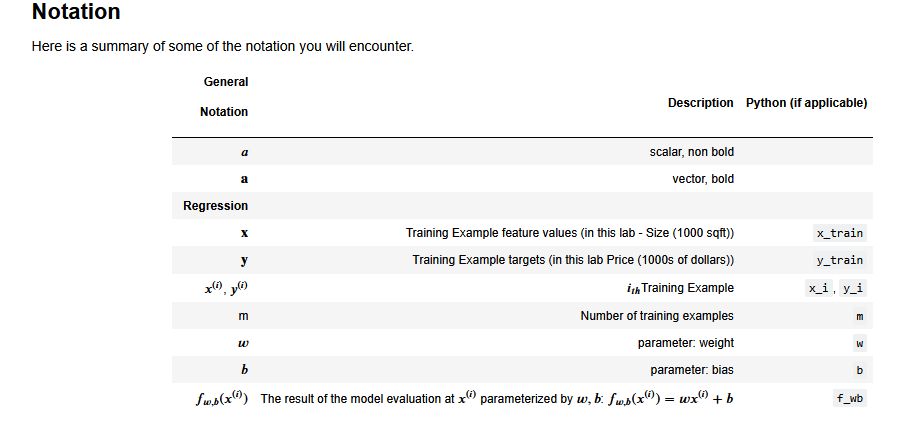
Please see the attached screenshots. The notations are not correctly rendered in the Jupyter notebook and they are very hard to read.


Link: Coursera | Online Courses & Credentials From Top Educators. Join for Free | Coursera
Please see the attached screenshots. The notations are not correctly rendered in the Jupyter notebook and they are very hard to read.
Link: Coursera | Online Courses & Credentials From Top Educators. Join for Free | Coursera
Hello @jacktan,
My experience is that it had worked for many labs but suddenly not for a lab, but then the problem went away after I had reloaded the page (sometimes after some time).
My understanding is that it has to do with (1) the browser, (2) the handling of java script by the browser, and (3) whether the browser can get the MathJax library. I think (3) was my problem because reloading helped. For (3), proxy setting, VPN, DNS setting, luck may be relevant; For (1) and (2), trying different browser, trying incognito mode, checking browser settings that restrict java script may help.
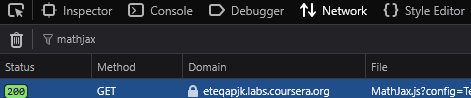
For (3), you might also check if there was any error related to “MathJax” in the Inspect console of your browser. For me, on the “Network” tab, the GET command for MathJax was a success with code 200, and on the “console” tab, there was also no critical error related to MathJax.
Cheers,
Raymond
Thanks Ray!
It seems, for me, the notation rendering stops working from time to time. Even the Jupyter notebook sometimes doesn’t load.
You are welcome, Jack. Since you posted in MLS Course 1 and tagged it week 1, I believe that’s where you were, so there would still be many labs ahead. For this, it would be worthwhile to go through my checklist.
Other than my checklist, a workaround is that, for long or really difficult-to-read math formula, copy-and-paste it to some server-side rendering service like this one or this - they render it server-side and return an image, so your browser won’t matter.
Lastly, if you search for other rendering service, pay attention that it is not a client-side service like this one because it will still rely on your computer. However, the funny thing would be that, if the client-side service works but the lab doesn’t, perhaps the lab was running into a problem (3).
Cheers,
Ray
As for the jupyter notebook, sometimes it would quickly finish the loading bar, but then stayed blank for like a minute or two before the jupyter interface finally showed up. I don’t have any theory for this but it also does not happen all the time, so if it stays blank for a long while, I will just have to re-try.
Yeah, this is exactly what I have been experiencing.